Are you looking for a way to import Outlook OST to NSF files into HCL Notes? If you’re wondering how to do it, this article will answer the question. Here, we provide a step-by-step guide on how to import Outlook OST to NSF files into HCL Notes. Let’s get started…
Overview
MS Outlook is an email software that belongs to the Microsoft Office suite. Outlook’s primary use is to manage users’ email profiles from their desktops.
Using MS Outlook, users can configure email profiles with different modes such as POP, IMAP, Exchange, etc. When a user configures an email account, Outlook automatically creates a data file to keep a copy of the Outlook profile’s data.
The data files used by Outlook are OST (Offline Storage Table) and PST (Personal Storage Table).
Also Read:- How to Convert OST file to PST in Outlook 365?
What is OST in Outlook?
Outlook creates OST files for users who configure an Exchange or IMAP account. These OST files act as a replica of the user’s email account’s mailbox available on the mail server. This OST file contains all emails, contacts, calendars, and other mailbox items.
When a user needs to migrate from Outlook to an application like HCL Notes with all their essential Outlook profile data, this OST file becomes a medium.
But the problem with OST files is that it is not possible to import OST files directly into HCL Notes.
What do you need to do to import Outlook profile data from OST to HCL Notes? Let’s find out.
Best Solution to Import Outlook OST to NSF files for HCL Notes
The easiest solution for importing Outlook OST to NSF files for HCL Notes is eSoftTools OST to NSF Converter Software. This smart tool allows users to easily convert all OST files to HCL Notes NSF files. Securely convert a single OST file, as well as multiple OST files, in a single process. Convert OST with all items intact, including emails, contacts, calendars, tasks, notes, journals, and more. Export Outlook items from OST to Gmail, Yahoo Mail, Office365, Outlook.com, and many other IMAP-based email programs.
How to Import Outlook OST to NSF files for HCL Notes?
- Take the help of eSoftTools OST to NSF Converter software and convert OST to NSF easily.
- Launch the software on a computer running the Windows operating system.

- Click on the ‘Select OST’ button and choose the method of adding file and conversion: – Single OST File Conversion, Bulk OST File Conversion.
- After selecting the conversion mode, press the Next button and add your OST files.
- After adding OST files, press the Start Scanning button and load mailboxes and items.
- Open OST files, get a preview of each item available, and choose the required folder.
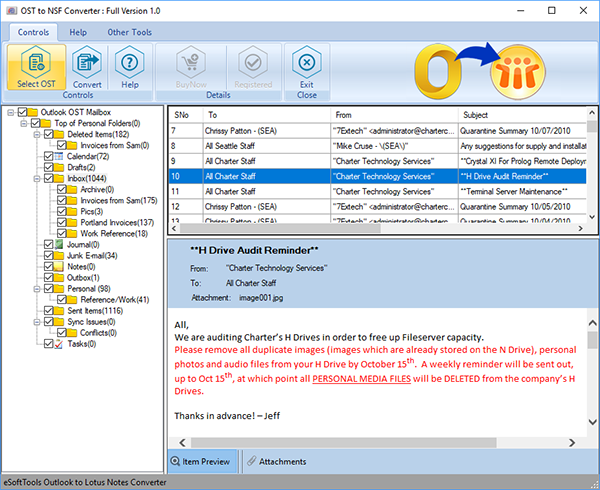
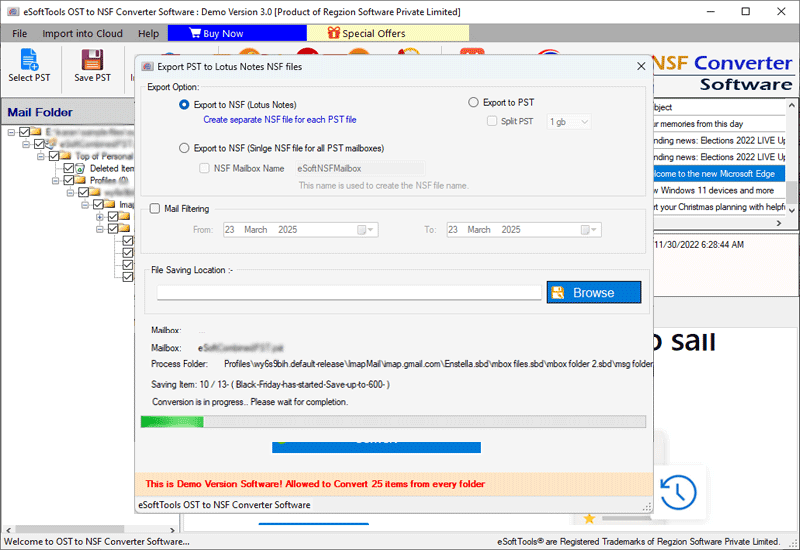
- Click on Save OST and select Export to NSF from the available export options.
- Use the email filtering feature to export emails for the required dates.
- Finally, click on Convert and start converting OST to NSF files for HCL Notes.
Conclusion
The most efficient way to import Outlook OST to NSF files for HCL Notes is with eSoftTools OST to NSF Converter software. Using this tool, you can easily do this task in a few simple steps. A free demo version of OST to NSF Converter is available for users to test its functions before purchasing.
FAQ
Is this software capable of converting OST to NSF without dependency on Outlook?
This software lets you convert OST to NSF without the need of MS Outlook application on your computer.
Will this tool also provide any other file format apart from NSF in which I can convert OST files?
It will also allow users to convert OST to NSF files as well as convert to PST file format.
Can it convert 10 Outlook OST files simultaneously?
With the bulk conversion mode of this tool, you can convert not only 10 but even more OST files simultaneously.
Can this software convert an OST file of 100GB in size?
There is no restriction on the size of the OST file; users can convert any size OST file (including 100 GB) without any problem.


No Comments yet!