Are you looking for a way to extract email address from Outlook OST /PST files in your Outlook mailbox? If so, this article will help you find the solution. Here, we’ll show you the best way to extract email addresses from Outlook PST/OST files.
Overview
Nowadays, a large number of people use the Microsoft Outlook application. MS Outlook’s primary function is email sharing. Users can easily configure and use their email accounts with MS Outlook, allowing them to send and receive emails.
Furthermore, Outlook enables users to create and manage contacts, calendars, tasks, notes, and journals. It also securely stores all emails and other data linked to a user’s email profile in files like OST and PST.
The email addresses in fields like TO, FROM, CC, and BCC are also included in each Outlook item found in these data files. In certain situations, Outlook users need to take out these email addresses and save them separately.
Also Read:- How To Extract Attachments from IMAP Server?
Reasons for extract email addresses from Outlook PST/OST files?
Users need to extract email addresses from Outlook PST/OST files for various reasons, some of which are listed below:
- Users prefer extracting email addresses from Outlook mailbox items to compile a list of all necessary contacts/email addresses.
- Users must extract all email addresses to filter and export the associated data. This helps export only necessary data from the many databases found in OST/PST files.
Best way to extract email address from Outlook PST/OST files
eSoftTools Outlook Email Address Extractor software is the best option for users. It is an automated tool that quickly extracts email addresses from Outlook PST and OST files. It assists in extracting email addresses from all Outlook mailbox items, including emails, contacts, calendars, and other mailbox items. Using a simple process, it extracts all email addresses without any data loss or misplacement.
Features of the Outlook Email Address Extractor software
- Quickly extract email addresses from your Outlook PST/OST files using this tool.
- Export email addresses from available mailbox items into Outlook PST and OST files.
- Extract all or specific types of attachments from Outlook mailbox items present in Outlook data files with this tool.
- With this software, email addresses and attachments can be extracted from multiple Outlook files at once without any problem.
- Select the email address using the TO, BCC, CC, From, and All options to extract it from a specific field.
- This software can be easily accessed on computers with any version of the Windows operating system, including Windows 11, 10, 8.1, 8, 7, XP, and other versions.
- It has a free demo version available that allows users to extract up to 15 email addresses from each PST/OST folder for free.
How to extract email address from Outlook PST/OST files?
- Download and run the Outlook Email Address Extractor tool on your Windows computer.

- Click the Select PST button and choose the file selection mode from the options provided: – Single OST/ PST file conversion, Bulk OST/ PST file conversion.

- Add the OST/PST file to the software, then press the Start Scanning button.

- All folders and items from the selected PST/OST files are loaded into the Outlook mailbox.
- View all items in the Outlook mailbox, including email addresses and other information.

- Select the necessary folder from the Outlook files and click the Extract Email Addresses button.

- Select and apply these required settings to extract Outlook email addresses: –
- Select a file type (CSV, TXT, or HTML) from the options to save the extracted email addresses.
- Choose the email address field from the options: TO, BCC, CC, From, or All.
- Extract email addresses from specific dates by entering the email sender’s dates in the “From” and “To” fields.
- You can manually specify where to save the resulting files that have email addresses.
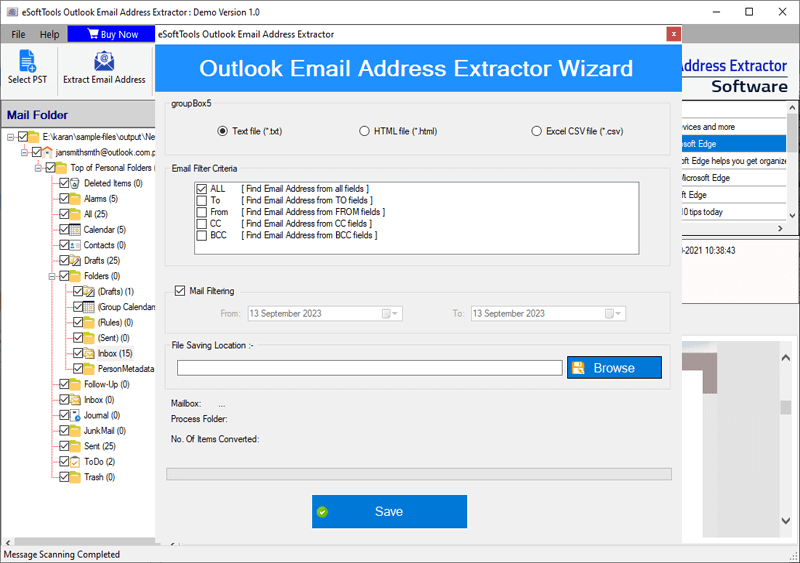
- You can manually specify where to save the resulting files that have email addresses.
- Store all extracted email addresses in one file.
- Create a unique file for saving the email addresses of each folder separately.

- Finally, click “Continue” to extract the email address from the Outlook OST/PST files.

Conclusion
For some users, it is necessary to extract email addresses from Outlook mailbox items. This article is for those who wish to complete this task securely. Follow the steps mentioned above and extract email addresses from Outlook PST/OST files. Also, try the free demo version of the eSoftTools Outlook Email Address Extractor software.


No Comments yet!