If you have a need to know how to transfer Lotus Notes emails to Outlook and you are not getting the method of doing it. Then read this blog, here we have given methods that non-tech savvy people can do easily
What are Lotus Notes?
Lotus Notes are NSF (Notes Storage Facility) files. It stores data such as emails, contacts, tasks, calendars, notes, etc. Previously these files were maintained by IBM Notes and now these files are maintained by HCL Notes. This software is used by many business clients for easy communication.
Why are Lotus Notes emails transferred to Outlook?
- Outlook has an user-friendly graphical interface that can be used easily.
- Outlook has more security features than Lotus Notes.
- Outlook has more advanced features than Lotus Notes.
Methods to transfer Lotus Notes emails to Outlook
- Manual Method
- Automated Method
Manual Method to transfer Lotus Notes emails to Outlook
In the manual method, NSF files are converted into CSV files and then CSV files are imported into Outlook and exported as PST files.
Steps to convert NSF file to CSV file
- Launch Lotus Notes software in your system.
- Select and open the NSF file in Lotus Notes Software.
- Go to the ‘File menu’ and choose the ‘Export’ option.
- Browse the location where you want to save the CSV file.
- Name the file and choose the Comma separated value as Save as type.
- Click the Ok button.
Now you have the CSV file saved in your system.
Steps to convert CSV file to PST file
- Launch Outlook software in your system.
- Go to the ‘File menu’ and choose the ‘Open & Export’ option.
- After that, choose the ‘Import & Export’ option.
- Select the option ‘Import from another program’ and click the Next button.
- Select the option ‘Comma Separated Value’ and click the Next button.
- Browse the location of the CSV file and Select the CSV file.
- Choose the option ‘Replace duplicates with items imported’ and click the Next button.
- Choose the destination where you want to save the file and click Next.
- Once the process is complete, click the Finish button.
Also Read: How to split the Lotus Notes NSF file? Know every step
Automated Method to convert NSF to PST
You can use the eSoftTools NSF to PST converter tool to transfer Lotus Notes emails to Outlook by converting NSF files to PST format. Its graphical interface is so easy to use that non-technical people can use it easily. It is the latest software with advanced features.
Steps to convert NSF files to PST
- Download and install eSoftTools NSF to PST Converter Software.
- Click the Select NSF button to select NSF files from the system.
- NSF conversion wizard will be open
- Single NSF file conversion: To select a single NSF file from the system for conversion.
- Bulk NSF file conversion: To select multiple NSF files from the system for conversion.

- Click Start Scanning button to scan NSF files.
- See the Preview of NSF files contents such as contacts, calendars, tasks, notes, etc.

- Choose the PST files for conversion from the dropdown menu.
- Browse the location where you want to save the PST file.
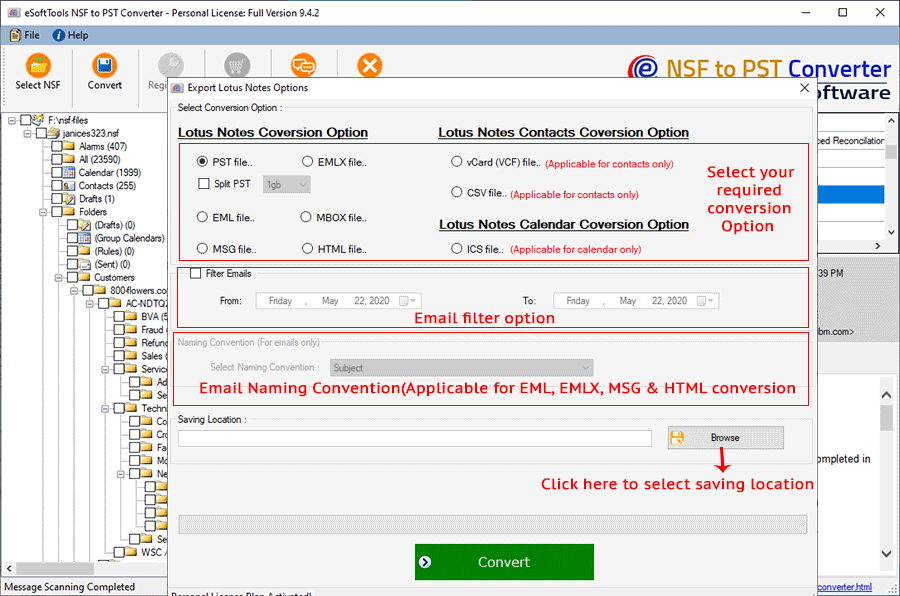
- Click the Convert button and Start conversion.
Conclusion
You can use manual methods but they have limitations such as they are time consuming and complex. Use the automated conversion method and use eSoftTools NSF to PST converter software for transfer Lotus Notes emails to Outlook because in a few steps you can easily do the job.


No Comments yet!