MBOX files are supported and opened in many email clients whereas PST files are opened in only Outlook. That’s why this PST file restriction encourages users to convert PST files to MBOX format.
What are PST and MBOX files?
PST (Personal Storage Table) that stores the data such as emails, contacts, calendars, notes, tasks and journals, etc. It is like a container that holds the Outlook data.
Many email clients support and open MBOX files, whereas only Outlook opens PST files. MBOX files just pack all the emails together in one long list.
Also Read: How to convert PST to MBOX Free?
Why convert PST files to MBOX files?
- MS Outlook only works with PST files, while email clients like Apple Mail, Thunderbird, Entourage, and Eudora handle MBOX files just fine.
- Outlook email client is costly and you have to purchase it after using the trial version whereas MBOX email clients are free of cost.
- Outlook is a big program that can store emails, contacts, calendars, tasks, notes, journals, etc. Therefore, corporate professionals can easily use these tools. So many users prefer MBOX email clients, which are not big programs.
Methods to convert PST to MBOX
- Manual Method
- Automated Method
Manual Method
In the manual method, you have to import the PST file in the Mozilla Thunderbird and then export it to the MBOX file.
- First, launch Mozilla Thunderbird in your system.
- Now, go to the Tools option in the menu bar.
- Click on the Import option from the list.
- Now Mozilla Thunderbird gives the options open.
- Select the option Import from Outlook and click Continue.
- After a series of steps click on the Start Import button and Importing of the PST files will continue.
- Now install the ‘ImportExportTools NG’ add-on in the Thunderbird.
- Select the Folder Export(MBOX) option from the Import ExportTools NG drop-down menu.
- Give the destination where you want to save the resultant MBOX file and click OK to convert the PST file to MBOX.
Automated Method
In the automated method, we use the third-party software eSoftTools PST to MBOX converter software. Fortunately, with this software, we can easily convert PST files to MBOX files. You can load single and multiple PST files at a time in the software and it has an option to search PST files from your system. The PST file structure, formatting and data integrity are maintained during the conversion. In the preview panel, you can see the list of files and folders from your PST files. Then, simply select the files and folders you want to convert to MBOX.
The option of email filtering is given in which you can filter emails according to date only you have to mention the start date and ending date of emails. Moreover, you can convert PST files to MBOX files without installing MS Outlook. This software can work in any Windows Operating System such as Windows 11, 10, 8.1, 8, 7, Vista, XP, and any previous versions. It converts PST to MBOX files that are supported by various email clients such as Apple Mail, Mozilla Thunderbird, Opera Mail, SeaMonkey, etc. Additionally, you can convert PST to MBOX in this software.
- Download eSoftTools PST to MBOX Converter Software and install it.
- Launch the software into your computer and press the “Select PST” button and two options will be displayed.
- Select PST File– Choose this option to select the PST file from the known location of the local drives of your system.
- Search PST file-Search and select the PST files from the unknown location of your drive.
- Start Scanning and you can preview the inner contents of PST files and folders.
- Next, simply select the necessary mailbox folders from your PST files to export them.
- Press the ‘Save PST’ button and select the ‘Export to MBOX’ radio button from the PST conversion options.
- Browse the location where you want to save the PST file to your computer.
- Choose the ‘Mail Filter’ option if you want to filter email (based on date).
- Click on the ‘Convert’ button and begin the process of PST to MBOX conversion process.
Conclusion
Now you know both manual and automated methods of conversion. In the manual method you can convert PST files to MBOX files but they are time-consuming and error prone methods. On the other hand you can use eSoftTools PST to MBOX converter software that is fast and 100 % accurate.
Now, Steps to Know How to Convert PST files to MBOX format
Step1: Download the Software

Step2: Select the Outlook PST file
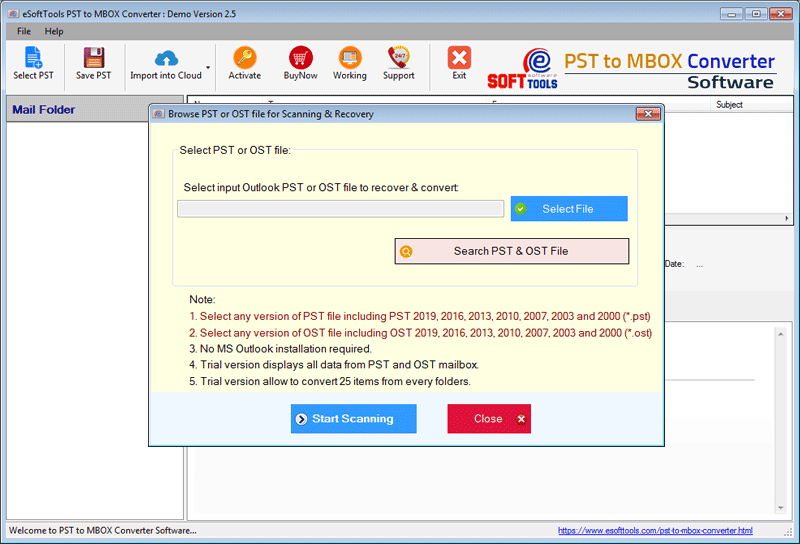
Step3: Start scanning process
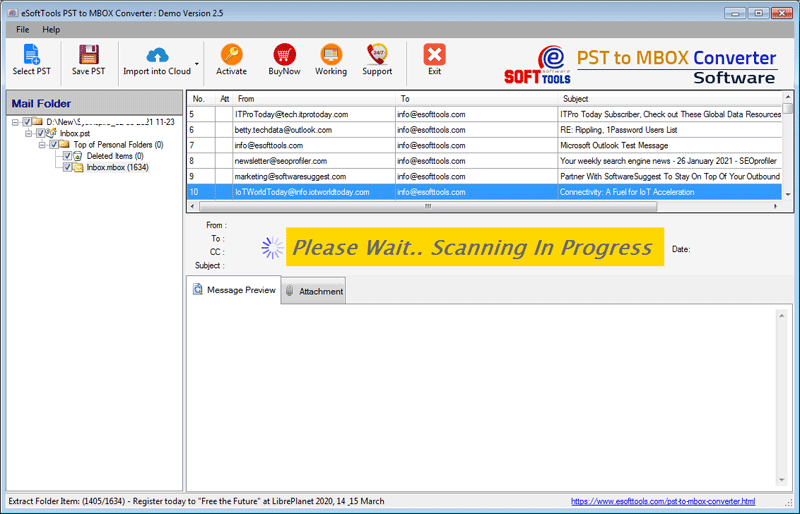
Step4: Preview of Outlook PST file data

Step5: Multiple conversion options available:

Step6: Process Completed


No Comments yet!