Now you can export Lotus Notes to Windows Live Mail in just a few simple steps. In this blog post, we will learn how to export Lotus Notes emails to WLM. Let’s get started.
Overview
Lotus Notes is an email client program. This email client system includes instant messaging, searching, file sharing, team rooms, and other smart business features. You can encrypt your NSF files or any email you send or receive with encryption. Lotus Notes also lets you work smarter and faster.
Windows Live Mail is a free email program from Microsoft. It was previously part of the Windows Live application suite. And was the successor to Windows Mail in Windows Vista and Outlook Express in Windows XP. It is compatible with Windows 10, Windows 7, and other previous versions. It also includes the ability to display addresses, calendars, and other features when the user is offline.
Also Read:- NSF to EML Converter- Export Lotus Notes Email to EML
Why users need to export Lotus Notes to Windows Live Mail
- Lotus Notes is an advanced email client, which makes it difficult for non-technical users to use it.
- Most users cannot afford Lotus Notes, while Microsoft’s Windows Live Mail is a free email service.
- Many users move to a new company that will require them to use their old Lotus Notes email in the main email client, Windows Live Mail.
Quick Solution to Export Lotus Notes to Windows Live Mail
Users can now export Lotus Notes to Windows Live Mail in just a few clicks using automated tools. Users can use the eSoftTools NSF to EML Converter software. With the help of this software, you can export Lotus Notes to WLM very easily. Its graphical user interface is also very clean, so you will not face any kind of problem.
Convert Lotus Notes file to Windows Live Mail EML
- Install and run eSoftTools NSF to EML Converter Software on your computer.
- Click the Choose NSF button and select the Lotus Notes NSF file you want to export.

- Now load the NSF file, and see the preview and select the required email folders or items.

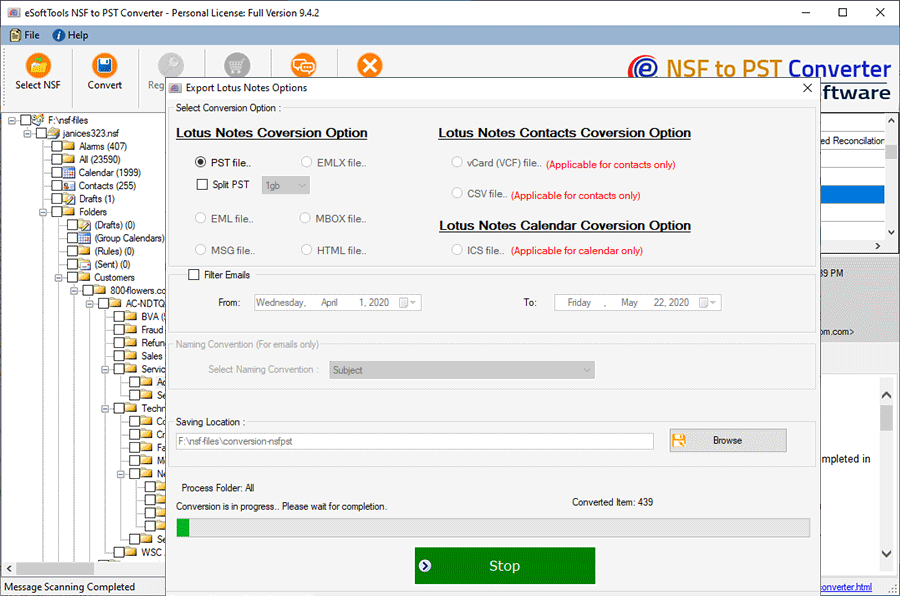
- Now, press the Convert button, then select the EML file from the conversion options.

- Click on the Browse button and select the destination path to save the EML files.
- After pressing the convert button, the results will appear in the specified location after a few minutes.
Import Converted EML file to Windows Live Mail
- In Windows Live Mail, click the File option in the top left corner. From the drop-down menu, select Import > Messages.
- Now, from the list of your email clients, select Windows Live Mail as your email client.
- Navigate to the location of your EML folder by clicking the Browse button.
- Select the required folder and click on Next.
- The import process will now begin.
- When the process is completed, click on the Finish button.
Conclusion
Through this blog, we have told the users a very easy process to export Lotus Notes to Windows Live Mail, so that you can export Lotus Notes to Live Mail without any problem, and you can also try the free demo of this software.
FAQ
Can I export names.nsf file to PST from this software?
Yes, you can extract data from names.nsf and convert the entire list of contacts and emails from names.nsf to a PST file format with this software.
Can this software import Lotus Notes emails into the Mozilla Thunderbird application?
Yes, with the help of this software, users can transfer Lotus Notes emails from NSF files to the Thunderbird email client.
Can this software run on Windows 7 and below?
Yes, this software is compatible with all versions of the Windows operating system, like Windows 10, 8.1, 8, 7, and XP.
Can I try the Free Demo Version of the NSF to PST Converter Software?
Yes, you can use the free demo of eSoftTools NSF to PST Converter software and export up to 25 items from all your folders.


No Comments yet!