Are you looking to convert EML to MBOX format when moving email clients? If so, this article has an easy solution for you. We’ll cover smart ways to convert EML to MBOX email files here. Let’s dive in…
Overview
The EML (Electronic Mail) format is how email clients save user emails locally on a computer. It enables users to get to their emails even when they aren’t connected to the internet.
An EML file is capable of containing emails and all pertinent attributes. It preserves emails with their message body, header data (date, subject, sender, recipient, BCC, etc.), text, images, hyperlinks, attachments, etc.
Besides EML, there’s another email saving format called MBOX. This is also a commonly used file type used in many popular email apps.
MBOX is utilized to archive or store emails locally, similar to EML, but it operates in another manner. A mail folder containing a large volume of emails and their relevant information can be stored within the MBOX file.
Also Read:- How to Import EML to IMAP Account Server?
Why convert EML to MBOX Email files?
- The EML to MBOX file conversion process assists users in migrating to email clients that prefer MBOX over EML.
- Only one email can be saved in an EML file, whereas many emails can be saved in an MBOX file. Thus, through conversion, a user can import emails from several EML files into one MBOX file.
- MBOX is a better choice than EML for users who want to store emails. MBOX files hold multiple emails, are easy to share, and work with many email apps.
Automated Program to Convert EML to MBOX Email files
There are several ways to convert EML to MBOX, but the easiest and safest method is to use software called eSoftTools EML to MBOX Converter Software. It is available for Windows users and works perfectly on any version of Windows, old or new. In a single process, it will convert one or more of your EML files to MBOX format. It will complete each conversion task without any errors and without changing any data. This tool allows users to directly open EML files and read data from them, along with several other smart options.
How to convert EML to MBOX Email files?
- Download eSoftTools EML to MBOX Converter software for Windows and follow the given steps for the conversion process: –
- Launch the software on your computer and press the ‘Select EML Folder’ button.

- Again, press the ‘Select EML Folder’ button from the new screen and load the EML folder.
- Select the EML folder, enter it, and then click the Next button.

- You can load EML files/folders and preview emails from each selected file.
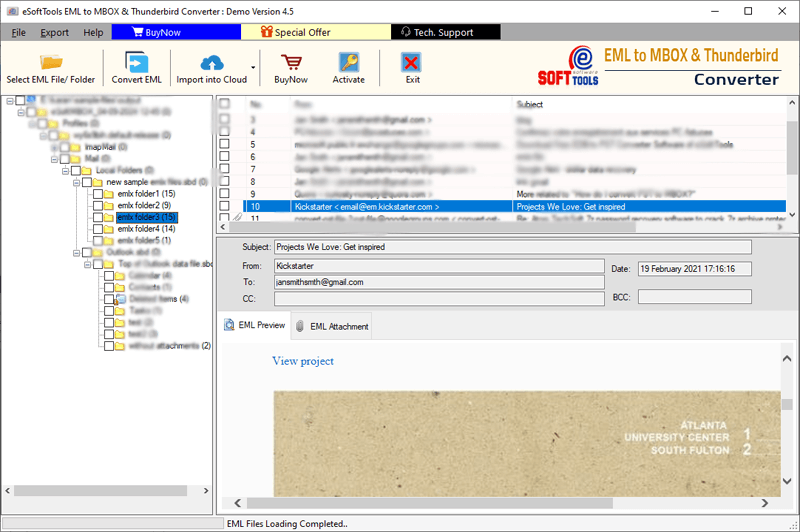
- Choose the necessary folder for conversion and press the ‘Convert EML to MBOX’ button.
- Click Browse on the next screen and choose the path to store the resulting MBOX files.
- Lastly, click Convert to begin the process of changing EML to MBOX email files.

Conclusion
EML and MBOX are two different file types used by email clients to store email locally. Users may want to convert EML to MBOX Email files when switching email clients, storing emails, or for other reasons. The best way to accomplish this conversion is to use the method described above. All users can achieve the best results with eSoftTools EML to MBOX Converter by using the method described above. Also, test all its functions now with its free demo version.


No Comments yet!