Sometimes a user needs to extract emails from MBOX files as individual files as EML files. If you are looking for ways to extract emails from MBOX files into separate email files,read this blog. In this blog, you will learn both manual and automated methods.
Many email clients such as Apple Mail, Mozilla Thunderbird, SeaMonkey, and Opera Mail support the MBOX (Mailbox file) format. The MBOX file stores emails in a concatenated format; that is to say, it saves all emails in a single file in a listed manner. Therefore, users can keep multiple emails organized within one file efficiently.
Also Read:- How to Convert MBOX File to PST?
Why extract emails from MBOX files?
- Sometimes users want to store email messages individually because in the MBOX file emails are stored together in a single file.
- Sometimes users want to have emails in the EML format because it is a safe method of storing emails.
- Users want to store email messages individually because individual messages are easy to share and forward.
- Sometimes users want to run emails on other email platforms.
Methods to extract emails
- Manual Method
- Automated Method
Manual Method
In the manual method, emails from the MBOX files are stored as EML files.
Drag and Drop Method
- Download and install Thunderbird software in your system.
- Open the MBOX file in the Thunderbird software.
- Create a New folder in your system and give a name to the New Folder.
- Drag the email from the Inbox and Drop the email to the New Folder.
- The email will be stored as an EML file.
Automated Method
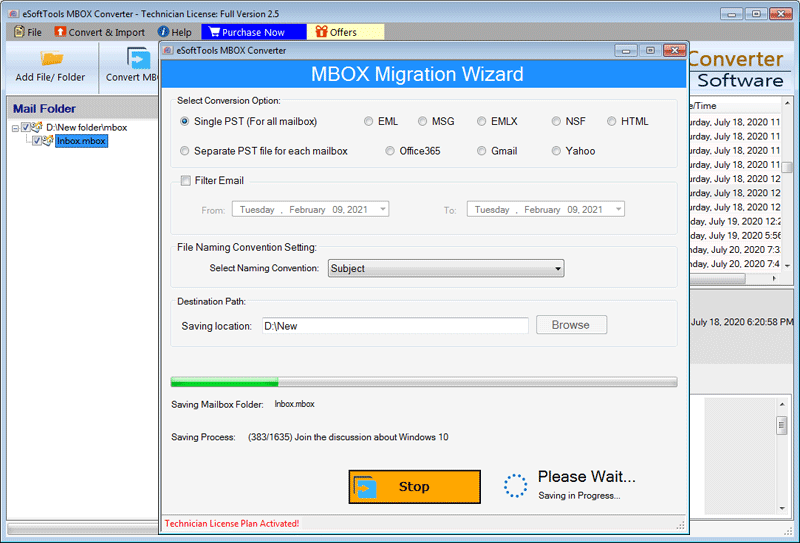
In the Automated Method, we use third-party tools such as eSoftTools MBOX to EML Converter software. In this software, firstly, you can load single and multiple MBOX files. After that, you can preview the contents of the MBOX file in the preview panel of the software. Then, you can select the files and folders which you want to convert into EML files. You can also filter emails by date by entering the start and end dates to narrow down the results. The software preserves data formatting, integrity, and folder hierarchy during the conversion process. It also displays email metadata such as To, Cc, Bcc, Subject, and From within the interface. In a few steps, you can convert the MBOX file to an EML file. In the demo version, you can convert 25 files from the MBOX folder to EML files.
Conclusion
In this blog, we have discussed methods to convert the MBOX file to EML files. You can use manual methods but they are time-consuming and error prone. The automated method is an easy and error-free method. With the help of eSoftTools MBOX to EML Converter software, you can easily convert MBOX files to EML files.
Steps to Know How to Extract Emails From MBOX Files
Step1: Download the Software

Step2: Click on Add File/Folder
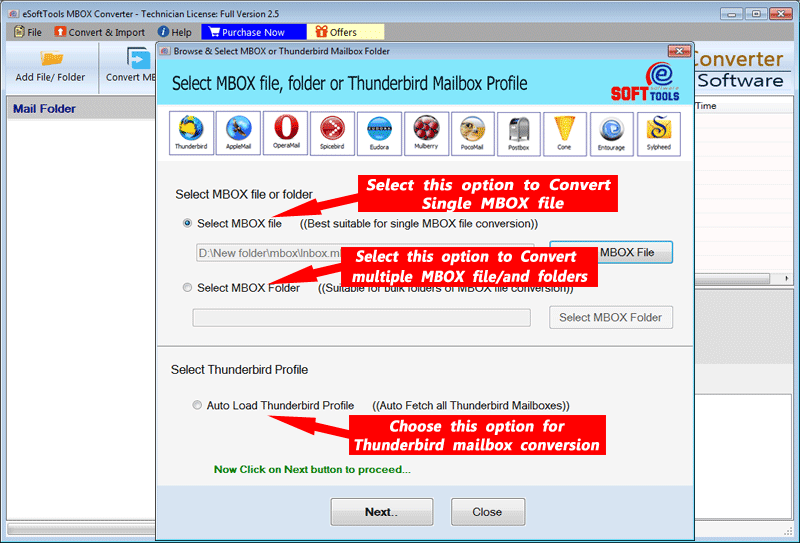
Step3: Get preview of all email messages

Step4: Choose Conversion options

Step5: Process Completed


No Comments yet!