Are you in need of exporting MBOX files to Outlook, but you don’t know how to do it? By reading this blog, you will learn methods of converting MBOX files to PST files and easily know how to export MBOX files to Outlook free.
What are MBOX and PST files?
MBOX file format is used by many email clients such as Apple Mail, Mozilla Thunderbird, Eudora, etc. As a result, all the emails of the MBOX file are stored in the concatenated way in only one file.
In simple terms, PST means Personal Storage Table. It is the independent file of MS Outlook that stores the data such as contacts, emails, calendars, notes, tasks, etc in it. If you want to migrate data from one computer to another computer then MS Outlook uses this file format.
Why need to know how to export MBOX files to Outlook free?
- MS Outlook interface is easier to use than the MBOX email clients.
- MS Outlook has more security features than MBOX email clients.
- Email clients that use MBOX files are not advanced so many organizations prefer to use MS Outlook.
- Cost efficiency of MS Outlook is better than MBOX email clients.
You can Read More: MBOX Converter Tool
Method to convert MBOX to PST
- Manual Method
- Professional Method
Manual Method
To begin with, there are two manual methods you can use to convert MBOX to PST
- Export MBOX file as EML file and Import EML file into Outlook: However, exporting the MBOX file as an EML file and then importing the EML file into Outlook is a time-consuming process.
- Connect the email address from the MBOX client to Outlook: First, you need to have an email account in the MBOX client; then, connect an Email account from the MBOX client to Outlook. Then, you can export email from MBOX to PST.
Professional Method
Alternatively, you can use the eSoftTools MBOX to PST converter software for converting MBOX files into PST format. This is a powerful and reliable solution to convert MBOX files to PST files. On the other hand, with batch conversion, you can convert multiple MBOX files into PST files in a few seconds. By following a few steps, you can convert MBOX to PST files in the eSoftTools MBOX to PST converter software.
- Download and install the MBOX converter software into your computer.
- Launch the software for opening the conversion wizard.
- Click on the Add File/Folder button on the top menu.
- Next, choose any one option to Select MBOX file by clicking the radio button.
- Select MBOX file and Load all inner items in the software.
- Select the required emails you need to convert into other formats like-PST, MSG, EML, EMLX, HTML.
- To export MBOX to PST , you have two option
1. Single PST (For all mailboxes)- In this option, you can make a single PST for multiple MBOX files/folders.
2. Separate PST(For each mailbox)– Alternatively, this option creates a separate PST for each MBOX mailbox.
- Now click on the ‘Browse’ button to keep your PST on the local computer.
- Click on the ‘Convert’ button to convert MBOX to PST.
Steps to Know How to export MBOX files to Outlook free
1. Download and Launch the Software

2. Next, select the MBOX file or folder.
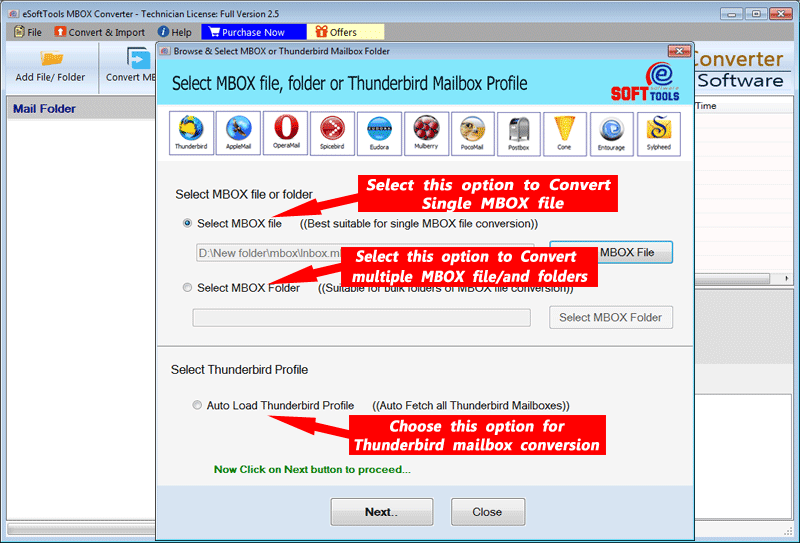
3. After that, get a preview of the MBOX file

4. Finally, select conversion options

5. Select the Saving options
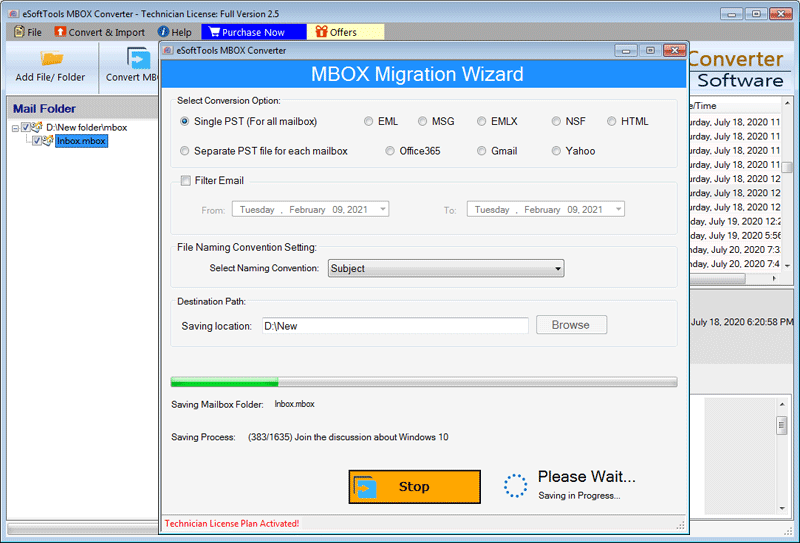
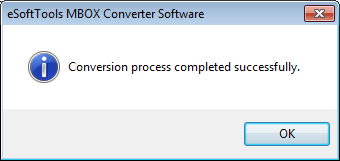
6. Conversion Process completed
FAQ Related MBOX converter tool
Yes, the software includes a demo version.
Yes, even if you are not familiar with technical concepts, you can use this software easily.
Yes, the software allows you to convert MBOX files to Gmail, Yahoo Mail, and Office 365.
Yes, you can convert multiple MBOX files.
Using this software, you can convert MBOX files into PST, EML, MSG, EMLX, HTML, and NSF file formats.
Conclusion
Both Manual and Professional Methods are given in this blog. If you are looking for a free method then a manual method is mentioned. If you are looking for a reliable method then use eSoftTools MBOX to PST converter software.


No Comments yet!