Do you need to export/convert MBOX emails to HTML, but are facing problems in exporting MBOX to HTML files? Then read this blog, and you will learn ways to export MBOX emails to HTML.
MBOX and HTML – An Overview
MBOX (.mbx or .mbox) files are supported by multiple email clients such as Apple Mail, Mozilla Thunderbird, Opera, SeaMonkey, etc.
HTML(.html) is also known as Hyper Text Markup Language. It is a text-based file that can be opened in any web browser. These files are edited in a text editor.
Why export MBOX emails to HTML?
- HTML files can be opened in any web browser, whereas MBOX files are opened in different email clients.
- As compared to MBOX files, HTML files are easy to edit.
- HTML files are saved without an internet connection, but in saving MBOX files internet connection is needed.
- HTML files do not need any email application.
Methods to convert MBOX files to HTML files
- Manual Method
- Automated Method
Manual Method
In the Manual Method, we will discuss steps to export/convert Mbox emails to HTML
- Download and install Thunderbird software on your system.
- In the software, go to Tools and then to ImportExportTools NG.
- Then, to ImportExportTools NG>> Import mbOX to import the MBOX file into the system.
- Again, go to the Tools and then choose the option ImportExportTools NG.
- Select the option Export all the messages in the folder>> HTML format(with attachments).
- Select the destination path and enter the Name of your output HTML file.
Automated Method
In the Automated method, use the eSoftTools MBOX Converter software. It is the easiest and most effective way to convert MBOX files to HTML files. It helps you to export/convert Mbox emails to HTML and other file formats such as PST, MSG, EML, EMLX, PDF, and NSF. This software can convert MBOX files in bulk to other file formats.
Also Read:- How to Export Mails from MBOX to HTML files?
Some features of this Tool
- It can convert and export MBOX files to web-based email clients such as Gmail, Yahoo Mail, Windows Live Mail, and Office 365.
- It maintains the email composition, email header, and email attachments while converting MBOX files.
- It maintains folder items in the same format while converting MBOX files to other file formats.
- It can convert single and multiple MBOX files at a time.
- It can convert any size MBOX file to other formats.
- There is no risk of changes in email messages and file modification during conversion.
- You can preview the inner contents of the MBOX file in the preview panel.
- There is no risk of any email or data alteration during conversion.
Steps to follow in the eSoftTools MBOX converter software
- Download and install the eSoftTools MBOX Converter software on your computer.
- Launch the software to open the conversion wizard.
- Click on the Add File/Folder button on the top menu.

- Next, choose any one option to select the MBOX file by clicking the radio button.
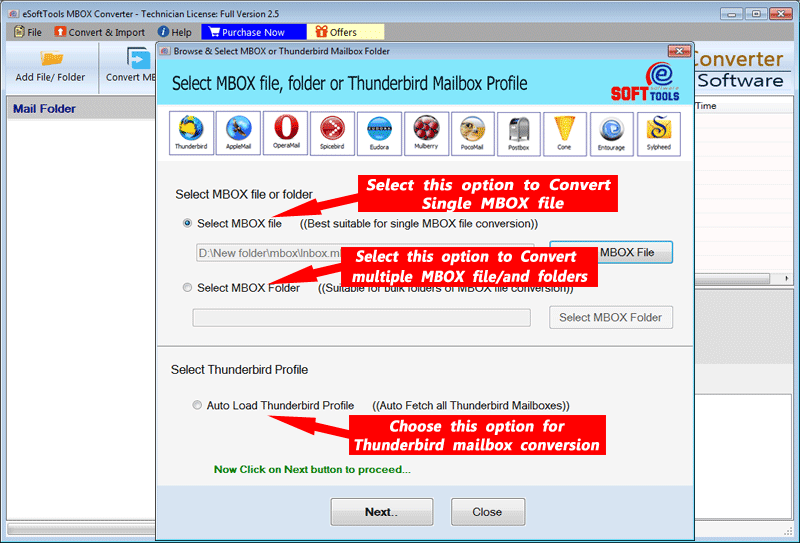
- Select the MBOX file and Load all the inner items in the software.

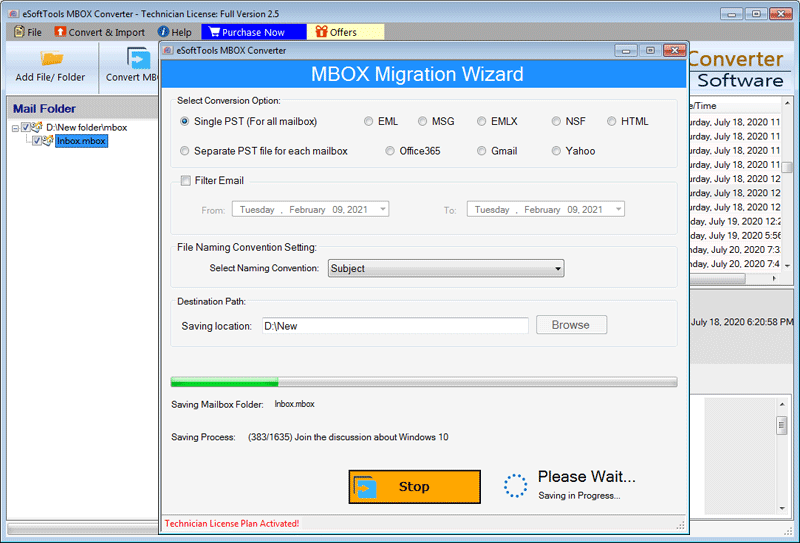
- Select the required emails you need to convert into other formats like PST, MSG, EML, EMLX, and HTML.

- Now, click on the ‘Browse’ button to save your HTML file on the local computer.
- Click on the ‘Convert’ button to convert MBOX to HTML.
Conclusion
These are the methods to export/convert Mbox emails to HTML. You can choose either of the methods, but the automated method is the best and professional approach for converting MBOX to HTML files.


No Comments yet!